
Harness engineering with Claude: 14-step roadmap from one agent to a self-improving system.

Everyone’s talking about loops. Almost no one is talking about what the loop runs on. 9 out of 10 builders run Claude Code on the default harness - no rules, no subagents, no hooks, no memory.
Then they wonder why their loop produces slop. The truth is simple: a loop is only as good as the harness underneath it. This is the 14-step roadmap to the harness - from one agent to a system that improves itself.
Loop engineering - building a system that prompts your agent on a schedule - got all the attention this month. But Addy Osmani, who wrote the long-form piece on loops, was careful to point at what sits below it:
“Loop engineering sits one floor above the harness. The harness is the environment one single agent runs inside. The loop is the harness, but it runs on a timer, spawns helpers, and feeds itself.”
Harness engineering is designing that environment: the model, the tools, the permissions, the context, the memory.
It’s the unglamorous layer - and it’s the one that decides whether everything above it works. A great loop on a bad harness is a fast way to produce garbage at scale.
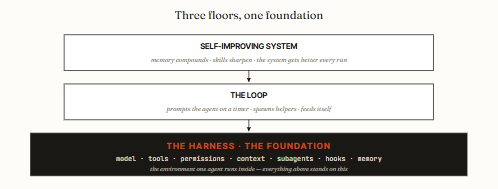
14 steps. 3 tiers. The foundation everything else stands on.
Part 1 · what Harness is
01. A harness is the environment one agent runs inside.
Strip away the jargon and a harness is four things: the model doing the thinking, the tools it can reach, the permissions on those tools, and the context it reads at the start of every run.
That’s the whole surface. Everything else - subagents, hooks, memory - is a way of shaping one of those four.
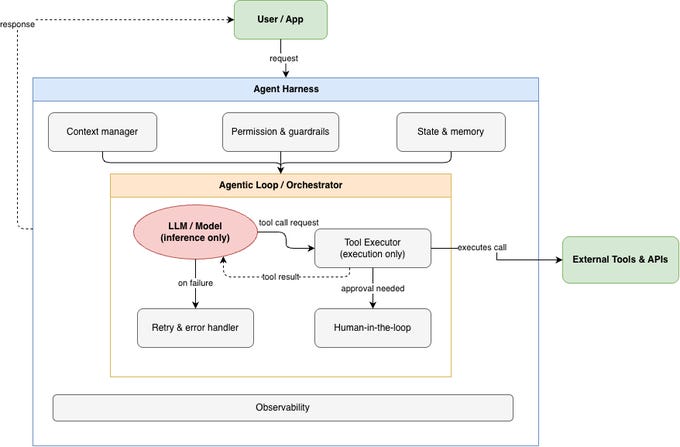
True loop that picks a tool, runs it, looks at the result, and decides the next move.
The harness defines what tools exist, what the agent is allowed to do, and what it knows when it starts. Same model, different harness, completely different agent.
02. The whole harness lives in one folder. .claude/
Everything that shapes your agent sits in a single directory at your project root. Learn this layout and you can read anyone’s harness at a glance:
.claude/
├─ CLAUDE.md          # standing facts — read every session
├─ settings.json      # permissions, model, hooks
├─ .mcp.json          # external tool connections
├─ rules/             # path-scoped behaviors
│  ├─ tests.md
│  └─ python-types.md
├─ agents/            # subagent definitions (~30 lines each)
│  ├─ reviewer.md
│  └─ eval-runner.md
├─ skills/            # reusable workflows
│  └─ pr-checklist/
│     └─ SKILL.md
└─ agent-memory/      # what survives between runs
   └─ STATE.md
One rule that separates a clean harness from a mess: keep it small enough that you can explain why every file exists. If you can’t say what a rule, hook, or subagent is for, delete it.
03. Harness vs loop vs system. Three floors, don’t mix them.
Most “my agent setup is a mess” problems come from confusing the three floors. Keep them straight:
The harness is the runtime one agent lives in. Static configuration: model, tools, permissions, context. This issue.
The loop prompts the agent on a timer, spawns helpers, feeds itself. It runs on top of the harness.
The self-improving system is a loop plus memory that compounds - every run leaves the next run sharper.
The practical version: put standing facts in context, enforcement in hooks, procedures in skills, and isolation in subagents.
Mixing these up - enforcement in CLAUDE.md, procedures bloating context - is the root cause of inconsistent, expensive agents.
04. The default harness. What you get out of the box.
Install Claude Code, open a folder, and you already have a harness - just an empty one. The default gives you a capable model, the built-in tools (read, write, bash, search), and approval prompts on everything risky. No project context, no custom subagents, no memory.
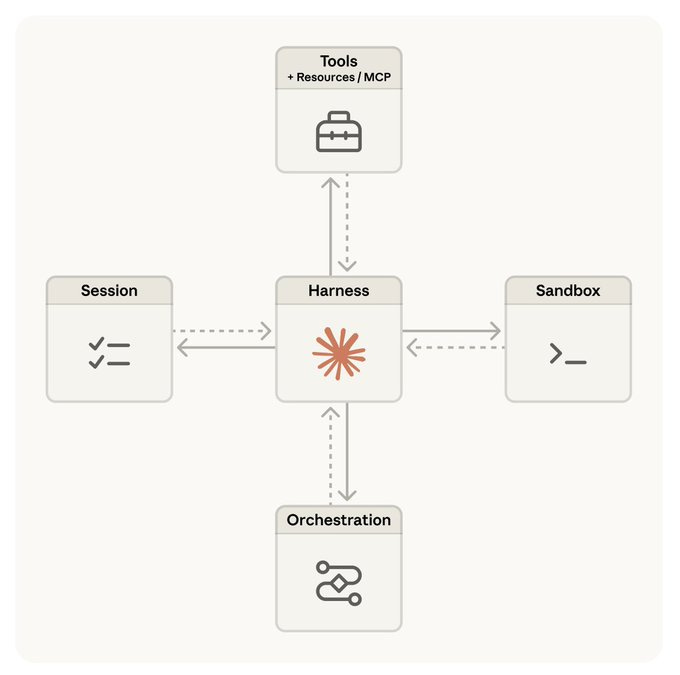
For a one-off task, the default is fine. For anything you do more than once, the default leaves the agent re-deriving your project from scratch every session, asking permission for safe operations, and forgetting everything when you close the terminal.
The next ten steps are about closing that gap.
05. CLAUDE.md: standing facts, kept short.
CLAUDE.md is read at the start of every session. It’s the agent’s standing knowledge of your project - conventions, architecture, the “we don’t do it this way because of that incident.”
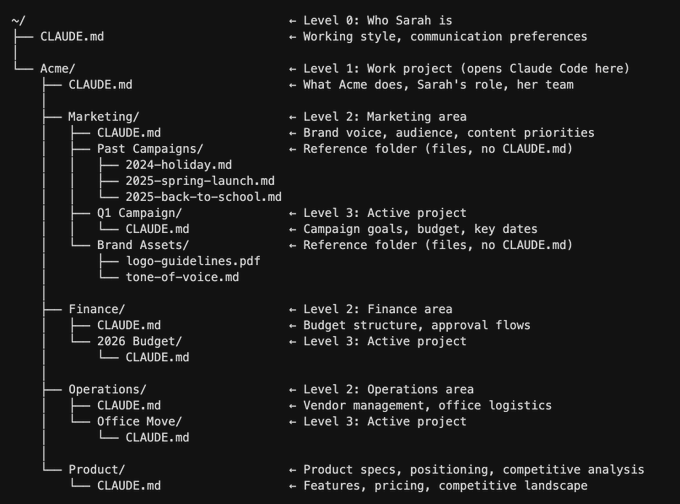
The single most common mistake: letting it grow into a giant procedures document that bloats every session.
The rule from practitioners running this daily: keep the main memory file under ~500 tokens. Standing facts go here.
Multi-step procedures go in skills (step 8). Path-specific behaviors go in rules/ files scoped to where they apply. If a section of CLAUDE.md has become a procedure rather than a fact, it belongs somewhere else.
Read your CLAUDE.md out loud. Every line should be a fact the agent needs in every session (“we use pnpm, not npm”). If a line is a procedure (“to add a feature, first…”), move it to a skill.
If it’s a rule for one folder, move it to rules/.
06. settings.json: permissions and model, set once.
The default harness asks before every risky action. That’s right when you’re watching and wrong when you’re not. settings.json is where you pre-approve the safe stuff, deny the dangerous stuff, and pick which model runs.
{
  "model": "claude-sonnet-4-6",
  "permissions": {
    "autoApprove": [
      "Read(*)", "Grep(*)",
      "Bash(npm test)", "Bash(git status)"
    ],
    "deny": [
      "Bash(rm -rf*)", "Bash(git push*)",
      "Edit(.env*)", "Edit(secrets/*)"
    ]
  }
}
The test for what to auto-approve: if this goes wrong, how hard is it to undo? Cheap to undo → auto-approve.
Expensive to undo (force-push, deleting files, touching secrets) → always deny or prompt. The middle ground is fine to auto-approve if you log it.
07. Subagents: isolated context for the dirty work.
A subagent is an independent Claude session launched from the main one - its own context window, its own tool list. The point isn’t parallelism for its own sake. It’s keeping noise out of the main context.
A research task that reads 40 files, a review pass that needs a fresh perspective, an eval run that produces a wall of logs - those belong in a subagent so they don’t pollute the main thread.
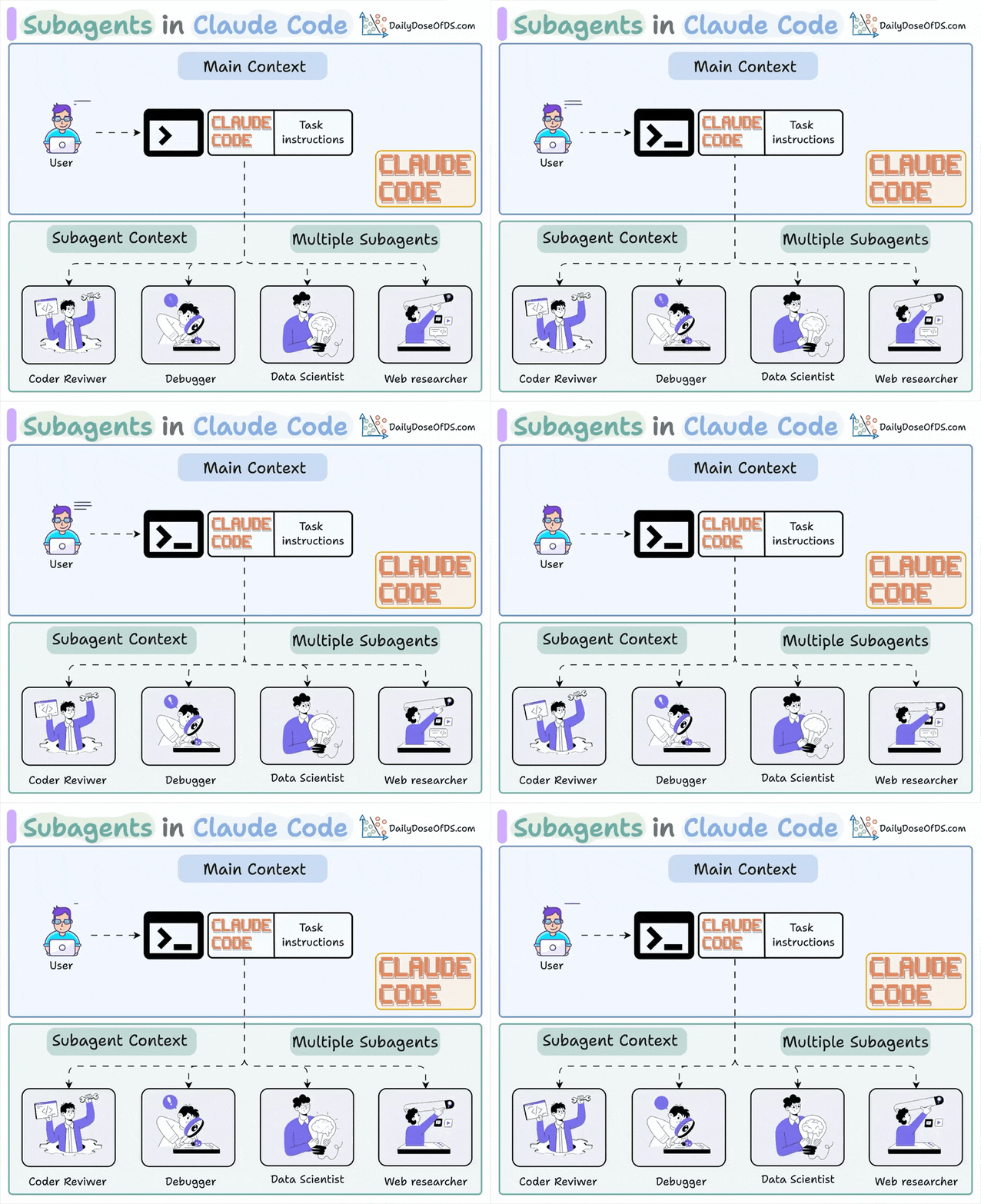
The most valuable subagent in any harness is the one that checks work the main agent did. A model reviewing its own output is too easy on itself;
A separate reviewer with a fresh context window catches what the writer talked itself into. This is the writer-vs-checker split that makes every loop above the harness trustworthy.
08. Skills: procedures the agent reuses.
A Skill is a SKILL.md file the agent runs - either when you call it with /skill-name or automatically when the task matches its description.
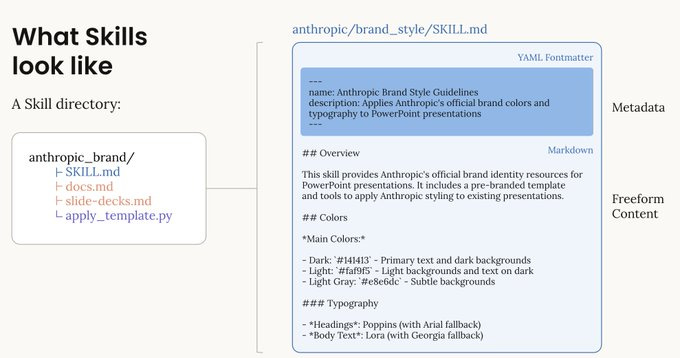
Unlike a subagent, it runs in the same context window. It’s just reusable instructions that become part of the session.
The trigger to create one: you notice yourself pasting the same instructions into every new conversation. That’s a skill waiting to happen. A PR checklist, an eval procedure, a release process - written once, invoked forever.
And because skills are the reusable unit, they’re what makes the harness improve over time: each time the procedure fails in a new way, you add the lesson to the skill, and the next run inherits it.
09. Hooks: deterministic rules the model can’t hallucinate.
Everything so far depends on the model understanding your instructions. Hooks don’t.
A hook is a shell command that fires at a fixed point in the agent lifecycle - before a tool runs, after a file changes, when the session ends- and its exit code can block the action. Hooks are enforcement, CLAUDE.md is suggestion.
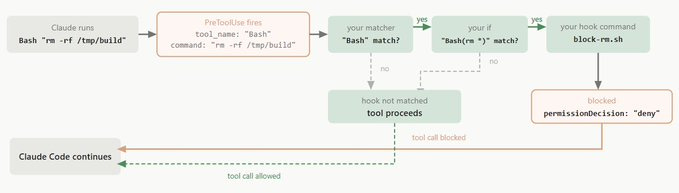
Two hooks earn their place in almost every harness:
A PreToolUse gate that blocks dangerous commands deterministically — rm -rf, reading .env, pushing to main. Exit code 2 stops the call before it happens. The model can’t talk its way past it.
A PostToolUse formatter that runs your linter or formatter after every edit. The agent never ships unformatted code because the harness formats it automatically.
"hooks": {
  "PreToolUse": [{
    "matcher": "Bash",
    "command": "./.claude/hooks/block-dangerous.sh"
    // exit 2 = block the call before it runs
  }],
  "PostToolUse": [{
    "matcher": "Edit|Write",
    "command": "prettier --write \"$CLAUDE_FILE_PATH\""
  }]
}
Use hooks for anything that must happen or must never happen - safety, formatting, audit logging.
Don’t use them for judgment calls; that’s what the model is for. A good harness has one or two sharp hooks, not twenty.
Part 3 · make It Compound
10. Add a loop. Now the harness runs on a timer.
A configured harness still waits for you to type. A loop makes it run on its own. The simplest version is /loop in Claude Code - a recurring prompt on a cadence.
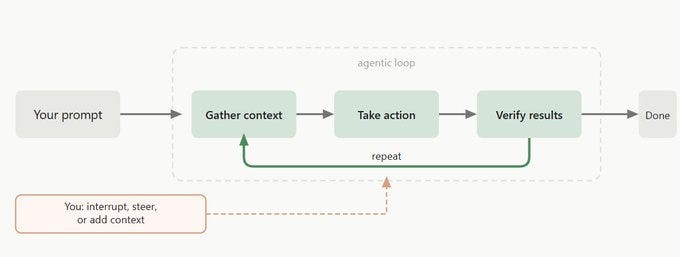
Pair it with /goal and the loop keeps going until an objective condition is true, checked by an independent grader rather than the agent grading itself.
> /loop 30m /goal All tests pass and lint is clean.
  Triage new failures, draft fixes in claude/ branches.

▲ Claude uses the harness you built:
  - rules/ for conventions
  - reviewer subagent to check each fix
  - PreToolUse hook blocks pushes to main
✓ Looping. Independent grader decides “done.”
Notice what just happened: the loop didn’t add intelligence. It re-used everything in the harness - the rules, the reviewer subagent, the safety hook. A good harness makes a loop trivial. That’s the whole point of building the foundation first.
11. Add dynamic workflows. The harness writes its own orchestration.
For tasks too complex for a single loop - massively parallel, highly structured, adversaria- Claude can write its own JavaScript harness on the fly.
That’s a dynamic workflow: agent() to spawn, parallel() to fan out, pipeline() to stream. It composes the subagents your harness defines into patterns like fan-out-and-synthesize or adversarial verification.
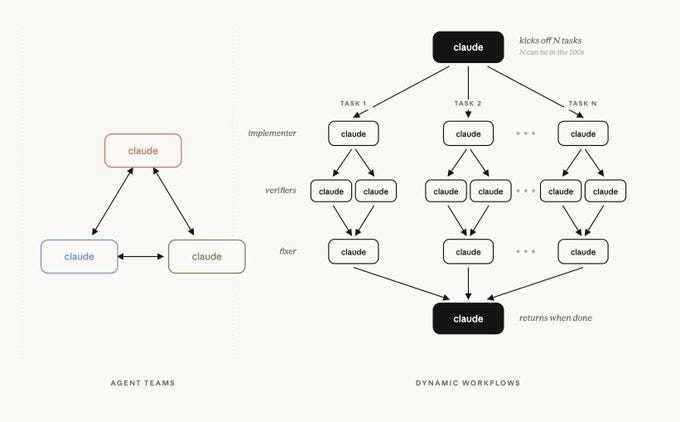
The connection to harness engineering: a dynamic workflow is only as good as the subagents and skills it can call.
If your harness has a sharp reviewer subagent and a well-written eval skill, the workflow has good pieces to orchestrate. If the harness is empty, the workflow has nothing to work with.
The workflow is the conductor, your harness is the orchestra.
12. Add memory. What the agent forgets, the harness remembers.
This is the step that turns a configured harness into a system that actually improves. The agent forgets everything between runs. The harness doesn’t have to.
A state file - a markdown file in agent-memory/, or a Linear board - records what was tried, what worked, what failed, what rules survived.
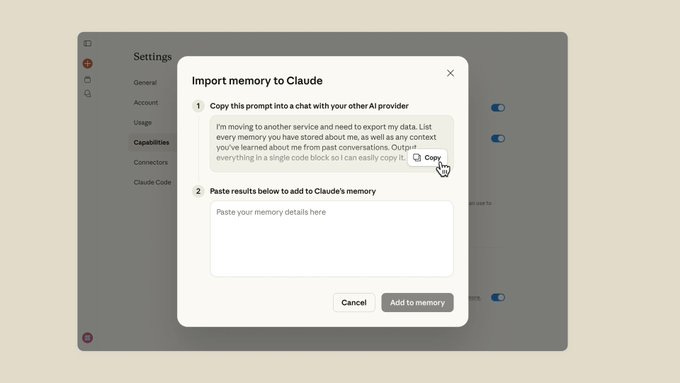
The pattern that makes memory compound, drawn from how the strongest agents use it:
Write before walking away. Every run ends by updating the state file - lessons learned, verified facts, what’s next.
Read at the start. Every run begins by reading the state file and relevant skills, so it resumes instead of restarting.
Distill into skills. When a lesson is general (“Windows runners need bash, not PowerShell”), it graduates from the state file into a skill, where it applies to every future project.
# Project memory

## Verified facts # stop guessing about these
- prc is in dollars, not cents (checked via SELECT MIN/MAX)
- auth middleware order: rate_limit -> jwt -> rbac

## Lessons learned # distill the general ones into skills
- Windows CI runners fail TLS 1.2 in PowerShell — use bash
- Migrations on tables >1M rows must batch in 10k chunks

## Last session # resume, don’t restart
2026-06-11 · 3 fixes merged, 2 escalated. Next: verify rate-limit fix.
13. Close the loop. Output → lesson → skill → better output.
Here’s where the three floors lock together into something that improves itself. Each run produces output. The reviewer subagent (step 7) checks it.
The result - what passed, what failed, what was learned - gets written to memory (step 12). The general lessons get distilled into skills (step 8).
The next run inherits sharper skills and richer memory.
That’s the whole self-improving loop, and notice it’s built entirely from harness parts:
Subagent grades the work - objective check, fresh context.
Memory records the verdict - survives between runs.
Skills a runs it again - now with everything the last run learned.
The loop runs it again - now with everything the last run learned.
The model never changed. The harness around it got sharper. That’s what “self-improving” honestly means - not a model that learns, but a harness that accumulates.
14. Ship the harness. Package it. Share it. Reuse it.
A harness that works on one project is an asset.
Bundle the skills, subagents, and rules into a plugin and your whole team installs the same setup in one step - same conventions, same safety hooks, same reviewer.
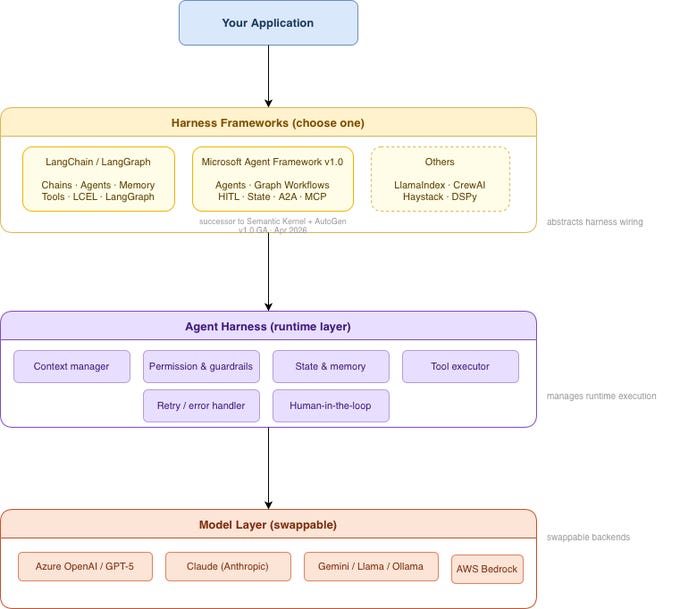
The harness stops being your personal setup and becomes shared infrastructure.
The order to build, one last time, because order is the lesson: get one manual run reliable on a clean harness.
Add the context and permissions. Add a reviewer subagent. Add memory. Then and only then wrap it in a loop. A loop on a good harness compounds. A loop on a bad harness just bleeds faster.
§ The harness mistakes that make every loop worse
Running on the default. No context, no rules, no memory - the agent re-derives your project every session.
A bloated CLAUDE.md. Procedures stuffed into standing context, bloating every run. Move them to skills.
Enforcement in CLAUDE.md instead of hooks. The model can ignore a suggestion. It can’t ignore a hook that exits 2.
One agent writing and grading its own work. Add a reviewer subagent with a fresh context window.
No memory. Every run restarts from zero. The state file is what makes tomorrow resume.
Wrapping a loop around a bad harness. The loop just produces slop faster. Build the foundation first.
Twenty hooks. One or two sharp ones beat a pile nobody understands.
Shipping a harness without scanning it. Leaked secrets and over-broad permissions spread to everyone who installs it.
Conclusion:
The loop gets the glory. The harness does the work.
Loop engineering is the exciting part - the agent prompting itself, running while you sleep. But a loop is just a harness on a timer.
Everything that decides whether the output is good or garbage lives one floor down, in the model you picked, the tools you allowed, the context you wrote, the reviewer you added, the memory you kept.
Build that floor well and everything above it compounds: the loop re-uses your subagents, the workflow orchestrates your skills, the memory makes each run sharper than the last.
Self-improvement was never a property of the model. It’s a property of the harness you build around it.
Pick one thing you’re not doing - probably a reviewer subagent, a safety hook, or a state file — and add it today. Keep the harness small enough to explain. Then put a loop on top, and watch the foundation do the work.