
How to master Claude Code: 10 techniques that turn vibe-coding into real engineering
4% of all public GitHub commits are now written by Claude Code - about 135,000 a day. Most people running it are getting maybe a third of what it can do.

4%of all public GitHub commits are now written by Claude Code - roughly 135,000 a day. But most people running it are getting maybe a third of what it can do.
They type a request, watch it spray code across forty files, accept whatever comes out, and call it “vibe-coding.”
Vibe-coding is a real and useful mode - describe what you want, let the agent build it. The problem is stopping there. When the diff is unreviewable, the tests never ran, and a change three days ago broke something you can’t trace, you don’t have a productivity tool. You have a slot machine.
The fix is not a better model. It is a better setup. Claude Code is a programmable platform with five extension layers most people never touch.
Below are ten techniques, built from Anthropic’s own best-practices docs - each shown with the real file or command you’d actually use, and a screenshot slot where you drop your own.
Same tool. Same model. A third of the output - or all of it.
PART 1 · Foundation
01. Write a CLAUDE.md
A CLAUDE.md file at your project root is read into context at the start of every single session, automatically - before you type anything.
It’s the closest thing Claude Code has to long-term project memory. Everything you’d otherwise re-explain on every task (your stack, your conventions, your non-negotiables) lives here once and is present every time.
The mental model that keeps it useful: CLAUDE.md is for things that must be true on every turn, in every task. Stack and global conventions, yes.
Here’s a complete, realistic one:
# Project: Reports Dashboard

## Stack
- Next.js 14, TypeScript, Tailwind
- Postgres via Supabase
- Tests: Vitest, in /tests

## Conventions
- 2-space indent, no tabs
- Named exports only, no default exports
- No new dependencies without asking first

## Always
- Run `npm test` before saying a task is done
- Keep changes scoped to exactly what I asked
- If you're unsure about an approach, ask before coding
The mental model that keeps it useful: CLAUDE.md is for things that must be true on every turn, in every task. Stack and global conventions, yes.
Task-specific procedures, no - those belong in Skills (technique 8), which load only when relevant and keep this file lean. A bloated CLAUDE.md is a real cost: every line is in context for every request, so treat it like a tight constitution, not a wiki.
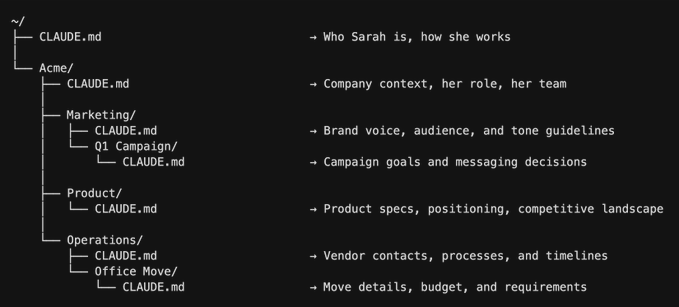
Pro nuance - the file hierarchy:
CLAUDE.md cascades. A file at the project root is shared with your team via git; a ~/.claude/CLAUDE.md in your home directory holds personal rules across all projects; nested CLAUDE.md files in subfolders add local rules for that part of the tree.
Team conventions go in the repo, personal quirks in your home file - and keep each one short, since every line costs context on every request.
02. Plan before you code
The vibe-coder fires a request and watches code appear. The engineer asks for a plan first - the approach, the exact files it’ll touch, the tradeoffs, the assumptions - and approves or corrects it before a single line is written.
The reason this works is mechanical: a plan is cheap to read and cheap to fix. Catching “you’re about to add a charting library I don’t want” in a one-line plan costs you one sentence.
Catching it after the code is written costs you a revert across a dozen files plus the context Claude already burned building the wrong thing.
The phrasing matters. Add “don’t write code yet” explicitly - otherwise Claude’s helpful instinct is to plan and immediately build. In practice the session looks like this:
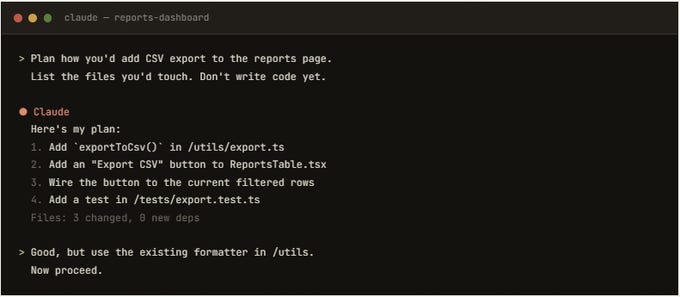
Why this matters most:
The three failure patterns that make AI coding infamous - silent wrong assumptions, over-engineering 50 lines into 500, and touching code it was never meant to - are all caught at the planning step. Plan-first is the single biggest reliability upgrade in this list.
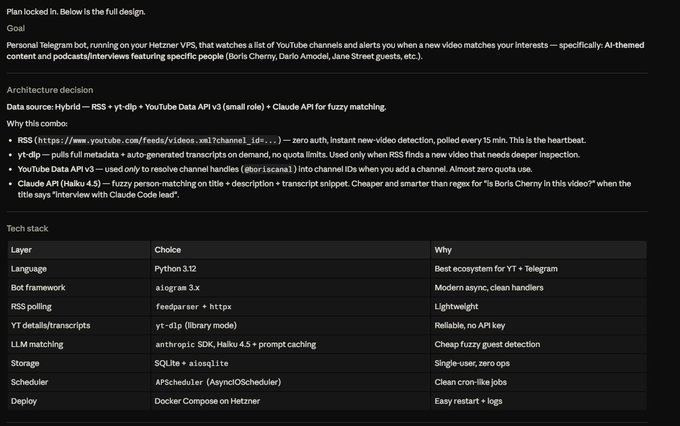
03. Scope tightly.
Broad requests produce broad, unreviewable diffs - and broad diffs are where bugs hide. The engineer scopes each task to one bounded change. “
Add a CSV-export button to the reports page that exports the currently filtered rows - nothing else” is a task with a clear edge.
“Improve the reports page” is an open invitation for Claude to rewrite half your app, refactor things you didn’t ask about, and bury the one change you wanted in three hundred you didn’t.
Tight scope pays off three ways at once: the diff stays small enough to actually review (technique 4), the context stays clean so quality stays high, and a wrong result is one cheap revert instead of a tangled untangling.
The slow loading, the cleanup, the refactor - each is a separate task, done separately, reviewed on its own. If you catch yourself writing “and” in a request, that’s usually two tasks.
The foundation is one file and two habits. Most people skip all three.
PART 2 · Control
04. Keep diffs small and reviewable.
The most dangerous output Claude Code produces is a giant diff you accept because reading it is too much work.
Code you didn’t review is code you don’t understand - and when it breaks at 2am, you’ll be debugging a stranger’s work that happens to live in your repo. The whole bargain of agentic coding only holds if you stay the reviewer: Claude writes fast, you verify deliberately.
This is the direct payoff of tight scope (#3). A bounded task produces a diff small enough to read line by line in under a minute - and reading it is where you catch the real bugs, the ones tests might miss:
+ export function exportToCsv(rows: Row[]) {
+   const header = Object.keys(rows[0]).join(",");
+   const body = rows.map(r =>
+     Object.values(r).map(escapeCsv).join(",")
+   ).join("\n");
+   return `${header}\n${body}`;
+ }
  1 file changed, 8 insertions(+)
Eight lines. You can read every one - and you might catch that escapeCsv needs to handle commas inside fields before it shis, not after.

05. Make Claude run the tests.
“The feature is complete!” is a claim, not a fact - and accepting claims is how unverified bugs reach production.
The fix is to make Claude actually run the tests and show you the output before anything is accepted. Not “did you test it?” but “run the suite and paste the result.”
The stronger version is test-first: have Claude write the test, run it, watch it fail, then write code until it passes.
This matters more with an AI than with a human - a failing-then-passing test proves the test actually exercises the new behavior, instead of being a green rubber-stamp Claude wrote to match whatever it already built.
Claude runs your suite itself, so the whole loop happens in one session:
bash
> Write a test for the export including the empty-rows
  case, run it, then implement until it passes.

⏺ Claude  wrote /tests/export.test.ts
⏺ running npm test …
  ✓ exports filtered rows to CSV
  ✓ includes a header row
  ✓ escapes commas inside fields
  ✓ returns empty string on empty input
  4 passed (0.41s)
Now “done” means green tests you watched run - and the empty-set bug that would’ve hit production died before merge.
06. Use hooks for what must always happen.
Here’s the distinction that makes this technique matter: CLAUDE.md instructions are advisory. Claude reads them and usually complies - but “usually” isn’t “always,” and on turn 40 of a long session, under a full context, a rule can quietly slip.
Hooks are deterministic. They’re shell scripts that fire automatically at fixed points in Claude’s workflow, run outside the model’s reasoning, and cannot be skipped, forgotten, or hallucinated away.
That makes them the right home for anything that must happen with zero exceptions. The events you can hook into include:
PreToolUse (before Claude runs a tool - use it to block dangerous commands like writes outside src/),
PostToolUse (after - run the formatter or linter on every edit), and UserPromptSubmit (inject context on every prompt).
Here’s a real PostToolUse hook that formats code after every single edit:
{
  "hooks": {
    "PostToolUse": [
      {
        "matcher": "Edit",
        "command": "npm run format"
      }
    ]
  }
}
A CLAUDE.md line (”always format after edits”) works usually. A hook works every time, no exceptions - the formatter runs whether Claude remembers or not. For anything that must be guaranteed, use a hook. Claude can even write the hook for you.
PART 3 · Scale
07. Connect MCP servers
By default Claude Code can see your filesystem and run shell commands - that’s it. MCP (Model Context Protocol) servers are how you give it everything else: your database, issue tracker, design files, monitoring, any SaaS tool. MCP is an open standard - think of it as USB-C for AI: one protocol, many devices.
Connect a server once and Claude gains real tools, so it can read a ticket straight from your tracker, query your actual schema instead of guessing column names, or pull a Figma design directly.
The key mental split: MCP is for access (connecting Claude to external systems), while Skills are for know-how (how to do something). They compose - an MCP server gives Claude your GitHub, and a Skill tells it how to review PRs against your team’s standards.
You add and inspect servers right from the terminal:
$ claude mcp add postgres
  ✓ connected: postgres (reports DB)

$ claude mcp add github
  ✓ connected: github (issue tracker)

> /mcp
  Connected servers:
  ● postgres   — query schema, run reads
  ● github     — read issues, open PRs
Now you can say “implement issue PROJ-241; check the reports table schema directly for the columns to export” - and Claude reads the ticket and queries the real schema itself.
No copy-paste, no stale schema, no human relay.
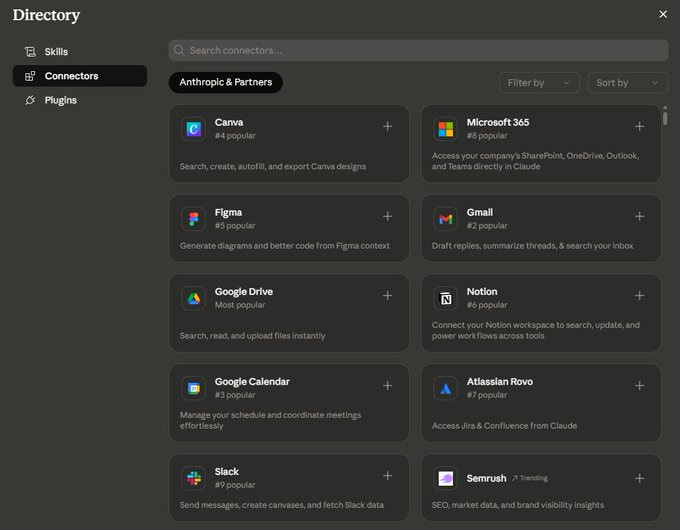
Every connected MCP server loads its tool definitions into context before you say a word - a typical five-server setup can cost roughly 55,000 tokens up front, versus about 100 tokens for a dormant Skill.
So connect servers you actually use and disconnect the ones you don’t. The instinct to wire up every available integration quietly shrinks your usable context window. Treat MCP servers as a deliberate, curated toolkit - not a junk drawer.
08. Write /Skills for repeated workflows.
A Skill is a folder containing a SKILL.md file - YAML frontmatter (a name and a description) plus markdown instructions, and optionally helper scripts. It packages a repeatable workflow: your deployment checklist, your migration procedure, your export conventions, your accessibility review.
The rule of thumb: if you’ve written the same instructions to Claude twice, that should have been a Skill the first time.
What makes Skills cheap is progressive disclosure.
At session start, Claude only sees each Skill’s name and description - about 100 tokens apiece - not the full body. It loads the full instructions (up to ~5K tokens) only when your task matches the description, and any referenced scripts only if it actually needs them.
That’s why you can have dozens of Skills installed without slowing anything down, and why Skills - not CLAUDE.md - are the right home for task-specific rules: they keep your always-on context lean and load in just-in-time.
Here’s the full file:
---
name: csv-export
description: How we generate CSV exports —
  use whenever the task involves exporting
  data to CSV or spreadsheet formats.
---

# CSV Export Standard

Every CSV export in this project must:
- Include a header row from the column names
- Use UTF-8 with a BOM (so Excel opens it cleanly)
- Escape commas and quotes inside field values
- Name the file: `report_{type}_{YYYY-MM-DD}.csv`
- Export only the currently filtered rows, not all data
Written once. From now on, every export Claude builds follows this standard automatically - the Skill loads itself the moment a task mentions CSV, and stays out of context the rest of the time.
Better still, Skills are portable and composable: one developer’s Skill becomes the team’s, the format is now an open standard, and you can stack several (a code-reviewer Skill alongside a git-automation Skill) and they cooperate.
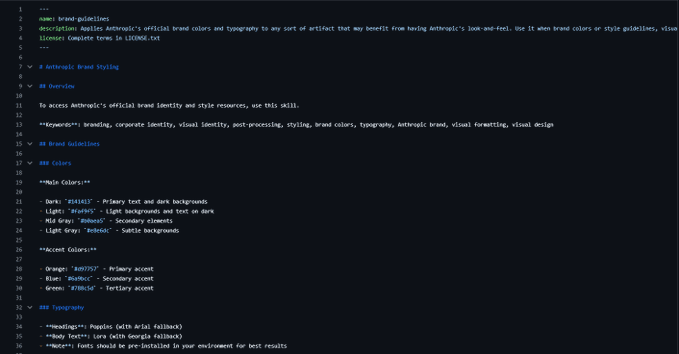
Because Claude decides whether to load a Skill purely from its description, that one line is doing all the heavy lifting. Vague descriptions (”helps with documents”) bloat your always-on token cost and risk Claude loading the wrong Skill - or missing the right one.
Write descriptions that name the exact trigger: “use whenever the task involves exporting data to CSV or spreadsheet formats.” Also worth knowing: Claude Code ships with bundled skills like /debug, /simplify, and /batch -try them before writing your own.
09. Delegate to subagents
Here’s the failure mode this solves: the classic mistake is doing 20 file reads and 12 greps in your main session to investigate something, then trying to plan the actual work with all that noise still loaded. By the time Claude codes, half its context window is junk and quality drops.
Subagents fix this by running in their own fresh, isolated context with their own tools and even their own model if you want (a cheap Haiku subagent for grep-heavy exploration, say). They do the noisy work and report back a clean summary:the noise never touches your main session.
The rule: spawn a subagent the moment a task would pollute your main context - research, code review, exploring an unfamiliar part of the codebase. Asking for one is plain English:
bash
> Use a subagent to map how exports currently
  work across the codebase, then report back a
  short summary. Keep my main context clean.

⏺ Claude  spawning subagent (own context)
  subagent read 214 files…
⏺ summary returned:
  - 3 existing export paths (PDF, XLSX, print)
  - shared formatter in /utils/format.ts
  - no CSV path yet — safe to add alongside
The 214 files of noise stayed in the subagent’s context. Your main session got one clean paragraph - and plans the build with a clear window.
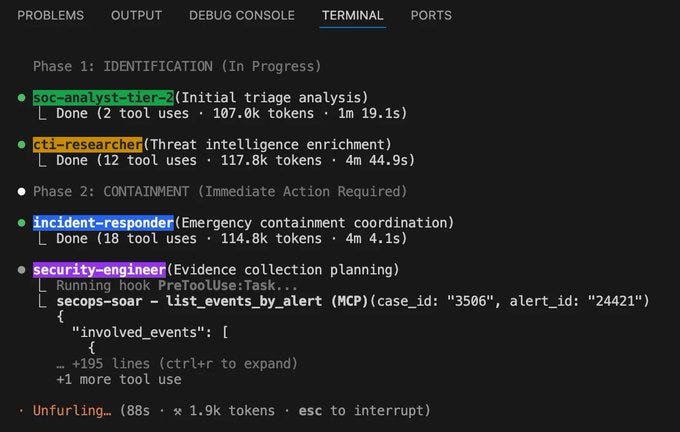
This is also how parallel work happens: a coordinator with specialist subagents for review, tests, and QA.
10. Match the model to the task.
Running every task on one model leaves either capability or money on the table. The three tiers exist for genuinely different jobs:
Opus for complex reasoning, architecture decisions, and gnarly debugging where being right matters most;
Sonnet for the bulk of day-to-day building, where it’s the best balance of speed and quality;
Haiku for fast, cheap, high-volume work like “find every file that imports X” or simple mechanical edits.
Matching the tier to the task is the difference between waiting (and paying) for deep reasoning on a trivial grep, and under-powering a hard architectural call.
You switch right inside the session:
bash
> /model opus     # architecture decision
  ✓ now using Claude Opus 4.7

> /model sonnet   # build the export feature
  ✓ now using Claude Sonnet 4.6

> /model haiku    # "find every file importing X"
  ✓ now using Claude Haiku 4.5
Reasoning power where it counts, speed and savings where it doesn’t. If quality is your only variable and budget isn’t, standardizing on the most capable model is defensible too - but make it a choice, not a default you never examined.
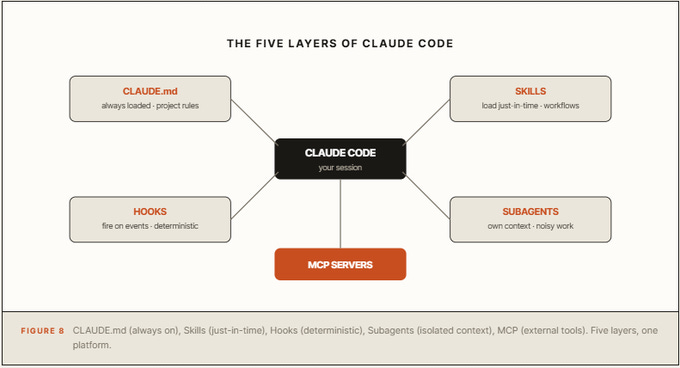
The whole system on one page
These 10 techniques map onto Claude Code’s five extension layers. Here’s how they fit together - each has a different context cost and a different job.
The habits that keep vibe-coders stuck
No CLAUDE.md. Re-explaining your conventions every session, and getting them wrong every session.
Skipping the plan. Finding out what Claude built only after it built it - across forty files.
Accepting diffs you didn’t read. Code you waved through is code you’ll debug at 2am.
Trusting “done.” If you didn’t see the tests run, the feature isn’t verified - it’s claimed.
Putting must-haves in CLAUDE.md instead of hooks. Advisory means “usually.” Some things need “always.”
Never leaving the chat box. Ignoring MCP, Skills, and subagents is using a third of the tool.
Conclusion:
The model writes the code. You do the engineering.
None of this slows you down. A CLAUDE.md takes ten minutes. A plan step takes one sentence. A hook takes five lines.
They’re the cheapest investments in software, and they convert a slot machine back into a tool you control.
Pick the one technique your setup is missing most - probably CLAUDE.md or the plan step - and add it to your next session. Then the next. The 4% writing commits today are just the people who started.